You can now initiate a subscription cancellation request directly inside the app via the dedicated subscription page, utilizing our Concierge service.
Here is a step-by-step guide on how to cancel any subscription you want directly within the Subpilot app using the Concierge feature:
1. Go to the Concierge View: Open the Subpilot app and tap the “Concierge” view located at the bottom of your screen.
2. Request Cancellation: Find the subscription you wish to stop and press the “Cancel for Me” button.
3. Fill Out Information: You will be prompted to provide information about you (like your full name, etc.). You may be asked to fill in any missing info required for that specific cancellation request.
4. View Status: Once submitted, you can view the status of your cancellation request right in the app.
2. Request Cancellation: Find the subscription you wish to stop and press the “Cancel for Me” button.
3. Fill Out Information: You will be prompted to provide information about you (like your full name, etc.). You may be asked to fill in any missing info required for that specific cancellation request.
4. View Status: Once submitted, you can view the status of your cancellation request right in the app.
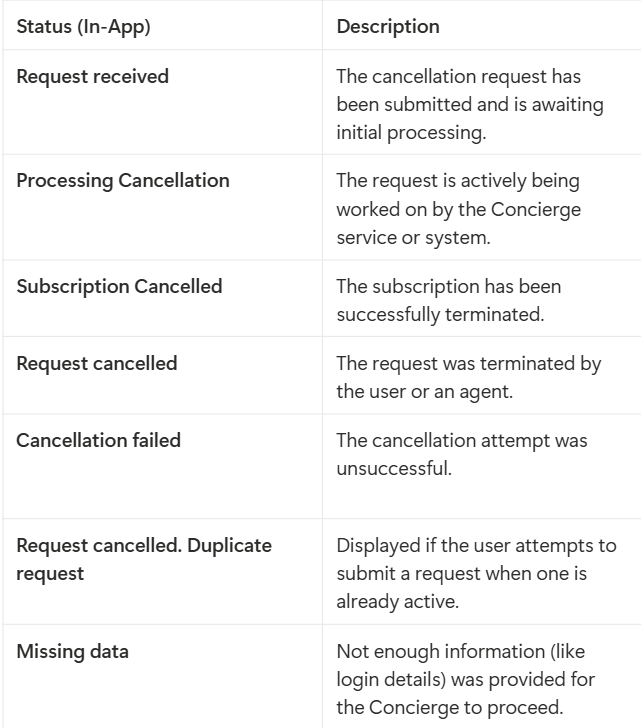
Statuses for In-App Cancellation Requests
You will see one of the following statuses on the subscription page, indicating where the Concierge service is in the process:
Need More Auto-Cancellations?
If you have many subscriptions and require more auto-cancellations than your current plan includes, you can easily purchase additional credits directly inside the app.
If you have many subscriptions and require more auto-cancellations than your current plan includes, you can easily purchase additional credits directly inside the app.
If you have further questions, do not hesitate to contact us at support@subpilot.finelo.com or by submitting a ticket at the Support Center.
Was this article helpful?
That’s Great!
Thank you for your feedback
Sorry! We couldn't be helpful
Thank you for your feedback
Feedback sent
We appreciate your effort and will try to fix the article